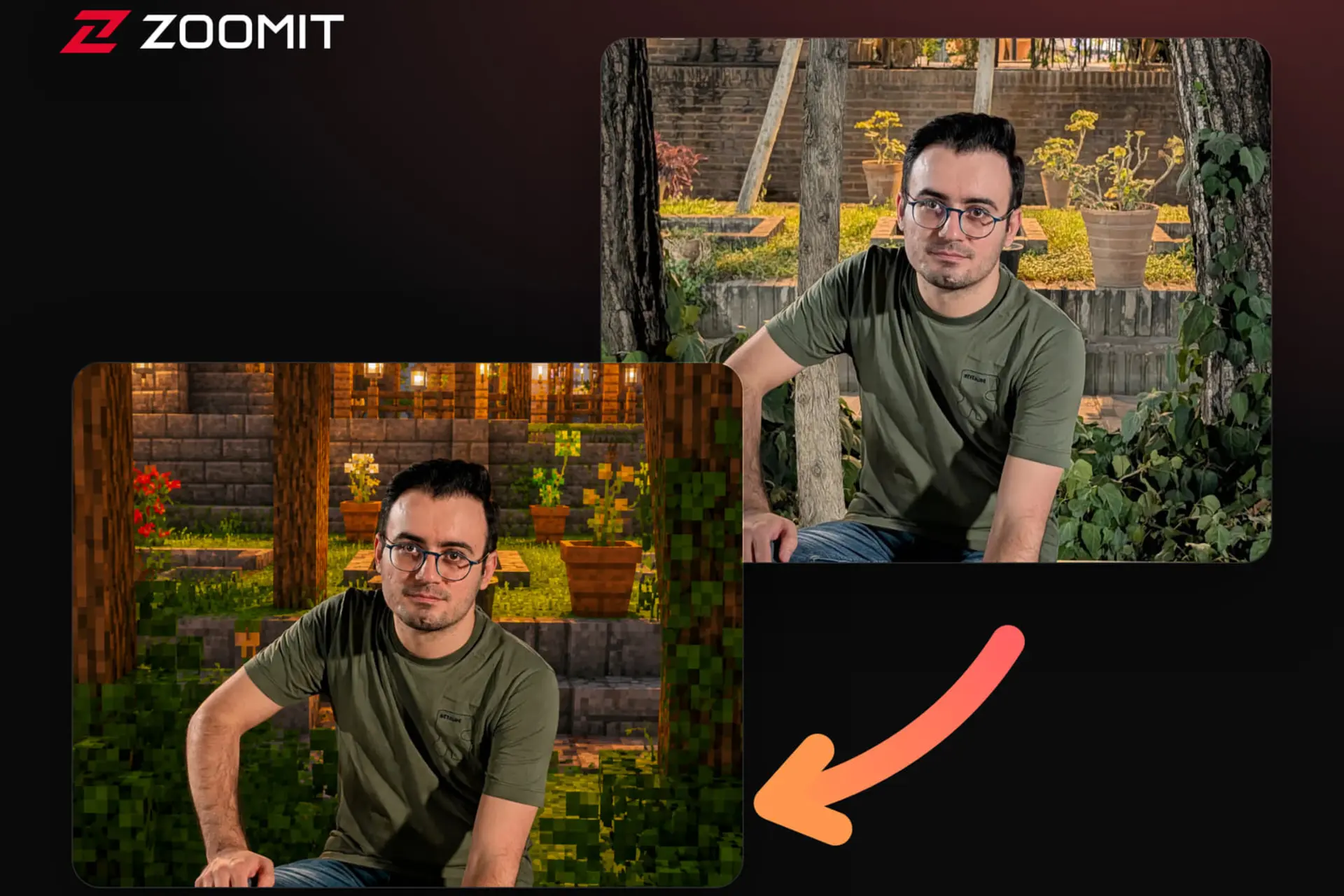
با یک پرامپت ساده و ابزارهای هوش مصنوعی، عکس خودتان را به دنیای پیکسلی ماینکرفت ببرید و پسزمینه تصویر را به سبک این بازی محبوب تغییر دهید.
تبلیغات
سبک Minecraft با ظاهر پیکسلی و دنیای مکعبی خود یکی از محبوبترین سبکها در میان کاربران بازی و تولیدکنندگان محتوای دیجیتال است. با کمک ابزارهای هوش مصنوعی میتوانید تصاویر معمولی را به شکل خلاقانه تغییر دهید و آنها را با حالوهوای این دنیای پیکسلی بازسازی کنید.
برای تغییر پسزمینه تصویر خود به سبک پیکسلی ماینکرفت:
- تصویری از خودتان را که بکگراند مناسبی دارد انتخاب کنید. برای بهترین نتیجه تصویر انتخاب کنید که تا حد امکان نور مناسب و پسزمینه قابل تشخیص داشته باشد و چهره شما بهطور واضح در آن مشخص باشد.
- سپس تصویر را همراه با پرامپت زیر به یکی از ابزارهای ساخت عکس با هوش مصنوعی مثل ChatGPT یا جمینای ارسال کنید.
Mincraft environment transformation Edit the uploaded photo by transforming **only the surrounding environment** into a realistic Minecraft-style voxel world. The person must remain completely unchanged from the original photo. Preserve exactly: • Face, identity, skin texture, and expression • Hair and facial features • Body shape, anatomy, and proportions • Pose, hands, and limb positions • Clothing, accessories, colors, and fabric details • Lighting and shadows already falling on the person • Sharpness, realism, and photographic appearance Do not pixelate, stylize, redraw, retouch, relight, reshape, or blockify any part of the subject. Do not place blocks in front of the person or alter the subject’s silhouette. ## ENVIRONMENT TRANSFORMATION Convert everything except the person into a detailed Minecraft-inspired block environment. Transform the original: • Ground and terrain • Buildings and architecture • Furniture and props • Trees, plants, and natural elements • Roads, walls, water, clouds, and sky • Background people or animals, if present Rebuild each environmental element using: • Clear cubic voxel geometry • Large pixel-based textures • Distinct block edges • Minecraft-like grass, dirt, stone, wood, glass, water, foliage, and other logically appropriate materials Match every converted element to the original scene’s location, size, angle, depth, and function. Preserve the original spatial layout rather than replacing it with a generic Minecraft landscape. ## COMPOSITION LOCK Maintain the original: • Camera position and lens perspective • Framing and crop • Subject placement and scale • Horizon line and vanishing points • Foreground, middle ground, and background depth • Overall lighting direction and time of day Use clean voxel lighting, subtle ambient occlusion, and soft block-shaped shadows while blending naturally around the realistic subject. The final image should look like the original real person was photographed inside a convincing Minecraft world. **Absolute rule:** Modify only the environment. The subject must remain identical to the uploaded photo.اگر عکستان را با این پرامپت به سبک ماینکرفت تبدیل کردهاید، نتیجه را با ما به اشتراک بگذارید. دوست داریم ببینیم شما چه دنیای پیکسلیای ساختهاید.

-638bb4a3b90c494dc77f531f?w=128&q=75)